




Shopify add to cart button - Worddes
441
wp-singular,post-template-default,single,single-post,postid-441,single-format-standard,wp-theme-bridge,theme-bridge,bridge-core-3.3.4.7,qi-blocks-1.4.9,qodef-gutenberg--no-touch,woocommerce-no-js,qodef-qi--no-touch,qi-addons-for-elementor-1.9.6,qode-optimizer-1.2.2,qode-quick-view-for-woocommerce-1.1.2,qqvfw--no-touch,qode-wishlist-for-woocommerce-1.2.8,qwfw--no-touch,qode-page-transition-enabled,ajax_fade,page_not_loaded,,qode_grid_1300,qode-content-sidebar-responsive,qode-smooth-scroll-enabled,columns-4,qode-theme-ver-30.8.8.7,qode-theme-bridge,disabled_footer_bottom,qode_header_in_grid,wpb-js-composer js-comp-ver-8.7.2,vc_responsive,elementor-default,elementor-kit-449

Shopify add to cart button

Shopify add to cart button

go to snippets and paste this code at the bottom

<code>
{% if product.available %}</code>
<div class=”card-grid-pro”><form action=”/cart/add” method=”post”><input name=”id” type=”hidden” value=”{{ product.variants.first.id }}” />
<input id=”quantity” min=”1″ name=”quantity” type=”number” value=”1″ />
<input class=”btn” type=”submit” value=”Add to cart” />
<input name=”return_to” type=”hidden” value=”back” /></form></div>
{% endif %}</code>
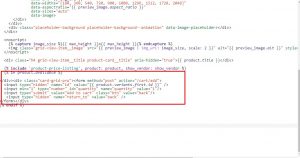
for add to cart page stay, the same page follow these links

https://community.shopify.com/c/Shopify-Design/Product-pages-Stay-on-the-product-page-after-adding-products-to/m-p/616440

No Comments

Post A Comment